http://fakesteve.blogspot.com/2007/11/for-once-cringely-gets-something-right.html
Friday, November 30, 2007
Steve Jobs talks about the 3G IPhone Slip
Just read it, sometimes Fake Steve is so funny, and dead on in a dark sort of way.


Live Upgrade step-by-step for Solaris Express
I have heard lots of good things about Live Upgrade -- it allows you to upgrade to a new version of the OS while giving you the option to go back to your old version. Pretty cool!
Live Upgrade requires you set up a partition that's the same size as your root partition. In the past, if you didn't do that yourself, you can find out you don't have enough space to do that. I and others gave some feedback about that.
So I was very happy to notice that when I installed SXDE 09/07 it said that if I had given it more than 20GB of space (which I had), then the install would automatically set up a partition to make it possible to do a live upgrade.
Sure enough, when the install was done, there was a mount called
So, after doing some research on the Web on how to do this, here are the steps I followed. You can also find the official instructions here.
Back Up your VMWare Image File
I didn't need to tell you to do this, did I?
Download the Image for the new OS
There are weekly builds of OpenSolaris called Nevada or Solaris Express Community Edition (SCDE) that have not gone through the same level of validation as Solaris Express Developer Edition (SXDE), which comes out about once a quarter (next one due in January).
So if you're brave and want the latest and greatest, get Nevada/SXCE. The latest one is build 78, with build 79 coming out some time next week. The nice thing is with Live Upgrade you can turn back the clock if you Otherwise, get the latest SXDE.
Mount the Image
Once you have the image, you can mount it into your current Solaris image using VMWare.
Choose Virtual Machine->CD/DVD->Choose Image... and then browse to your .iso file.
Upgrade LiveUpgrade
You heard me right. Before you can do Live Upgrade, you need to install the latest version of Live Upgrade. This seriously bit me in my last attempt about six months ago. It makes sense when you think about it, but, you know, hindsight is 20/20...
Find out where the CD is mounted to (it's usually under
and then let it do its thing.
Create a Live Upgrade Unit
So, first step is to make a copy of your root partition. This is done with
First, you need to get the device name for
Take a note of that, and then unmount
Once you've done that, run the following command
Where
This will run for quite some time, as it is copying your entire root partition. Time to go get a cup of coffee...
Note: keep an eye on things in the Performance Monitor. I noticed code>vmware-guestd taking up all the CPU and lucreate was asleep - if this happens, you can safely kill vmware-guestd, and then things will move along. I think this issue is fixed once you install the VMWare tools (I'm not sure though).
Run the Upgrade
This is done pretty simply. If your new image is mounted in the standard place, it will look like this:
Where nv78 is whatever name you gave to your new partition.
Activate the New Partition, And Go
Run
to activate your new boot environment. This command, when run, provides very useful information on how to get *back* to your current boot environment if for some reason reboot fails, so do take note.
Make sure you fully shutdown, versus "soft reboot" by using the shutdown command or the init command. The simplest way to do this is to do a full shutdown; if necessary (it shouldn't be) shut down the virtual machine using VMWare's code>Virtual Machine->Shut Down Guest.
When you reboot, you'll be in the new operating system version. If you ever want to go back, run
Note that the startup menu lets you pick which boot environment you want to run in. Pretty nice!
My only complaint is that it took longer for me to run the upgrade than it did to make a clean install. But I guess that's to be expected, upgrading is a more complicated process.
Issues
I noticed that PostgreSQL did not start up in build 78.
Also I got an error saying there was a version mismatch for the 'vmhgfs' filesystem, and the HGFS module could not be started. However, I could see my shared directory no problem.
The screen resolution stuff appears to be kind of broken in build 78. This has been reported and hopefully will be fixed in subsequent releases. It's workable, but not nearly as nice as with SXDE 09/07.
Live Upgrade requires you set up a partition that's the same size as your root partition. In the past, if you didn't do that yourself, you can find out you don't have enough space to do that. I and others gave some feedback about that.
So I was very happy to notice that when I installed SXDE 09/07 it said that if I had given it more than 20GB of space (which I had), then the install would automatically set up a partition to make it possible to do a live upgrade.
Sure enough, when the install was done, there was a mount called
/second_root that was exactly the same size as my / partition:
# /usr/ucb/df
Filesystem            kbytes    used   avail capacity  Mounted on
/dev/dsk/c0d0s0      9294575 6742458 2459172    74%    /
...
/dev/dsk/c0d0s4      9294575    9233 9192397     1%    /second_root
So, after doing some research on the Web on how to do this, here are the steps I followed. You can also find the official instructions here.
Back Up your VMWare Image File
I didn't need to tell you to do this, did I?
Download the Image for the new OS
There are weekly builds of OpenSolaris called Nevada or Solaris Express Community Edition (SCDE) that have not gone through the same level of validation as Solaris Express Developer Edition (SXDE), which comes out about once a quarter (next one due in January).
So if you're brave and want the latest and greatest, get Nevada/SXCE. The latest one is build 78, with build 79 coming out some time next week. The nice thing is with Live Upgrade you can turn back the clock if you Otherwise, get the latest SXDE.
Mount the Image
Once you have the image, you can mount it into your current Solaris image using VMWare.
Choose Virtual Machine->CD/DVD->Choose Image... and then browse to your .iso file.
Upgrade LiveUpgrade
You heard me right. Before you can do Live Upgrade, you need to install the latest version of Live Upgrade. This seriously bit me in my last attempt about six months ago. It makes sense when you think about it, but, you know, hindsight is 20/20...
Find out where the CD is mounted to (it's usually under
/cdrom), and then run something like the following:
# /cdrom/sol_11_x86/Solaris_11/Tools/Installers/liveupgrade20
and then let it do its thing.
Create a Live Upgrade Unit
/second_root/. This is what will be upgraded, and then you will "switch" roots when you want to run in the new operating system. If you want to go back, the old one is still there, and you can "switch" back. Cool, huh?So, first step is to make a copy of your root partition. This is done with
lu_create.First, you need to get the device name for
/second_root. Do a df to find out. From above, you can see mine is c0d0s4.Take a note of that, and then unmount
/second_root and comment it out from /etc/vfstab. This is important, lu_create won't work if it thinks /second_root is in use.Once you've done that, run the following command
# lucreate -c sxde907 -n nv78 -m /:c0d0s4:ufs
Where
sxde907 is the name you want to give your current OS version, nv78 is whatever name you want to name your new OS version, and c0d0s4 is whatever the device name is for your /second_root partition.This will run for quite some time, as it is copying your entire root partition. Time to go get a cup of coffee...
Note: keep an eye on things in the Performance Monitor. I noticed code>vmware-guestd taking up all the CPU and lucreate was asleep - if this happens, you can safely kill vmware-guestd, and then things will move along. I think this issue is fixed once you install the VMWare tools (I'm not sure though).
Run the Upgrade
This is done pretty simply. If your new image is mounted in the standard place, it will look like this:
# luupgrade -u -n nv78 -s /cdrom/sol_11_x86
Where nv78 is whatever name you gave to your new partition.
Activate the New Partition, And Go
Run
# luactivate nv78
to activate your new boot environment. This command, when run, provides very useful information on how to get *back* to your current boot environment if for some reason reboot fails, so do take note.
Make sure you fully shutdown, versus "soft reboot" by using the shutdown command or the init command. The simplest way to do this is to do a full shutdown; if necessary (it shouldn't be) shut down the virtual machine using VMWare's code>Virtual Machine->Shut Down Guest.
When you reboot, you'll be in the new operating system version. If you ever want to go back, run
luactivate again to activate the old bood environment, e.g.# luactivate sxde907
Note that the startup menu lets you pick which boot environment you want to run in. Pretty nice!
My only complaint is that it took longer for me to run the upgrade than it did to make a clean install. But I guess that's to be expected, upgrading is a more complicated process.
Issues
I noticed that PostgreSQL did not start up in build 78.
Also I got an error saying there was a version mismatch for the 'vmhgfs' filesystem, and the HGFS module could not be started. However, I could see my shared directory no problem.
The screen resolution stuff appears to be kind of broken in build 78. This has been reported and hopefully will be fixed in subsequent releases. It's workable, but not nearly as nice as with SXDE 09/07.
Uncle, Uncle!
My little sister had a baby girl last night. I am so frustrated she is all the way in London! I feel very proud and happy. Her name is Charlotte, after my dear great aunt who recently passed away, and her middle name is Josephine, after our grandmother.
Welcome, little Charlotte Josephine Örnebring.
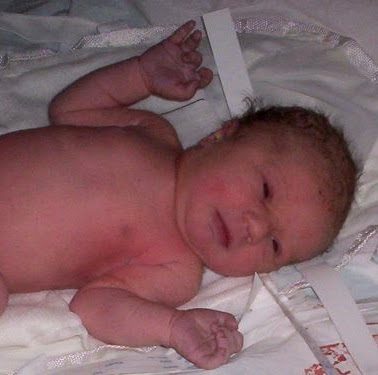
Welcome, little Charlotte Josephine Örnebring.

Thursday, November 29, 2007
VMWare Fusion 1.1 performance - give it some time
I am continuing to happily run Solaris Express Developer Edition under VMWare Fusion 1.1 on my Mac. This is now my primary development environment
I had some nasty performance issues at first. I have a 5400RPM disk drive, and when I was running Solaris, I would experience regular "lock downs" where my computer became almost completely unresponsive while the disk chewed and chewed and chewed.
I finally moved my disk image to an external USB drive, and was much much happier.
Then earlier this week, I tried running my image on my main disk again, and it actually is working great, no issues at all.
I think the issue is that VMWare allocates disk space on demand. So when I was first getting going, installing lots of stuff, pulling down source trees and so on, VMWare kept asking the Mac for more disk space for its image.
But now the disk size has stabilized, and that's not happening any more.
If I were to do it again, I think I might do the following:
I suspect if I had a 7200 RPM disk, this wouldn't be so much of an issue. I think I'll put that in as a budget request for next quarter :)
I had some nasty performance issues at first. I have a 5400RPM disk drive, and when I was running Solaris, I would experience regular "lock downs" where my computer became almost completely unresponsive while the disk chewed and chewed and chewed.
I finally moved my disk image to an external USB drive, and was much much happier.
Then earlier this week, I tried running my image on my main disk again, and it actually is working great, no issues at all.
I think the issue is that VMWare allocates disk space on demand. So when I was first getting going, installing lots of stuff, pulling down source trees and so on, VMWare kept asking the Mac for more disk space for its image.
But now the disk size has stabilized, and that's not happening any more.
If I were to do it again, I think I might do the following:
- Put the image on a separate disk initially
- Write a script to create a big file in my image filesystem, then delete it. This forces allocation of space
- Move the image back to my main disk.
I suspect if I had a 7200 RPM disk, this wouldn't be so much of an issue. I think I'll put that in as a budget request for next quarter :)
Tuesday, November 27, 2007
SQL Server Express - nothing "Express" about it!

I have been trying most of the day to get SQL Server Express installed on a lab Windows XP machine. I need this to try and reproduce a problem somebody is having with NetBeans and SQL Server.
What a friggin nightmare!
Someone prior to me had installed the beta of SQL Server Express, which now appears to have expired and won't start. So I downloaded the new version, which refused to install, saying that "Beta Components of .Net, Visual Studio, or SQL Server 2005 are causing problems. Please fix this" or something to that effect.
Um, OK... Not very helpful.
I tried uninstalling the old version. Get this - it is installed but it refuses to uninstall because it says it is missing the .Net 2.0 framework. Gads!
Ok, back to Microsoft, download and install .Net 2.0. Same problem. Reboot. Same problem. The @#%@% system tells me .Net 2.0 is installed, but it refuses to uninstall. And the new version refuses to install, same error.
What, are you doing everything you can to make me not use your software??!! Amazing...
For the sake of my customer, I'll have to try this again tomorrow. But if I were a developer, I'd be throwing this thing out the window and moving to Java DB.
Landon Fuller builds a dev preview of Java 6 on Mac OSX Leopard
Wow. Thank goodness for open source. Three cheers for Landon!
Berkeley Mayor Tom Bates on Solar Financing Plan
City financing of up-front costs of solar installation: really cool idea, and, living in Berkeley, one I hope we can take advantage of.
http://earth2tech.com/2007/11/06/qa-with-berkeley-mayor-tom-bates-on-solar-financing-plan/
Nati Shalom's Blog: Architecture You Always Wondered About: Lessons Learned at Qcon
Nati Shalom, CTO and founder of GigaSpaces, has a very interesting blog describing the architectures of some of the Big Scale Web Guys out there -- what the patterns were, what lessons were learned, etc. Check it out...
http://natishalom.typepad.com/nati_shaloms_blog/2007/11/architecture-yo.html
Monday, November 26, 2007
Auto-creating your embedded Java DB database - some working code
A lot of folks are surprised when an embedded database doesn't work the same as a client/server database. In particular, they don't initially realize that it is the application's responsibility to create the necessary tables and load them with any initial data the first time the application is run in a new location. Many of use are used to the database just being out there on a server somewhere and aren't used to having this responsibility.
I asked for a blog or tutorial on how to do this on the Derby user mailing list, and one user, Alan Burlison, was kind enough to point me to his work. And I quote:
No tutorial, but some working code
This runs inside Tomcat and creates a new database the first time it is run, subsequent runs use the existing database. The database runs in embedded server mode, so whilst Tomcat is running you can access it externally as well.
The database is initialised via SQL script files that are contained in the application WAR file, using the ij utility (derbytools.jar). ij can be run from inside an application as well as from the command-line, and ij + SQL scripts is the easiest way I've found so far of setting up a database, because the SQL scripts can be debugged from the command-line before being embedded in the app.
I asked for a blog or tutorial on how to do this on the Derby user mailing list, and one user, Alan Burlison, was kind enough to point me to his work. And I quote:
No tutorial, but some working code
This runs inside Tomcat and creates a new database the first time it is run, subsequent runs use the existing database. The database runs in embedded server mode, so whilst Tomcat is running you can access it externally as well.
The database is initialised via SQL script files that are contained in the application WAR file, using the ij utility (derbytools.jar). ij can be run from inside an application as well as from the command-line, and ij + SQL scripts is the easiest way I've found so far of setting up a database, because the SQL scripts can be debugged from the command-line before being embedded in the app.
More info on PostgreSQL in Solaris Express
I got a tip from one of the folks on the PostgreSQL team here at Sun. There is a lot of very useful information on Postgres 8.2, which ships with Solaris, through the man page.
So try
And have a read. It tells you a lot more useful details than what I provided, and can prevent you from getting a bit lost and confused trying to set this up.
So try
man postgres_82
And have a read. It tells you a lot more useful details than what I provided, and can prevent you from getting a bit lost and confused trying to set this up.
Photos from Antarctica
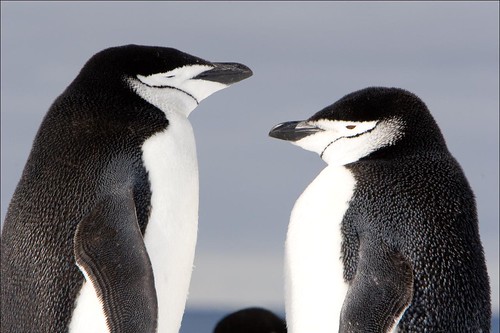
My brother and Dad are back, and the first set of photos are in!
My brother is a wonderful photographer, and these shots attest to that.
Monday, November 19, 2007
NetBeans, Ruby on Rails, and PostgreSQL on Solaris
I needed to track down an issue with PostgreSQL and the Ruby on Rails support in NetBeans today, and in the process learned what you need to do to get PostgreSQL working on Solaris with NetBeans.
There are two approaches you can do. You can use the Cool Stack Ruby on Rails package, which is optimized for Solaris. Or you can use the JRuby/Ruby On Rails support that comes with NetBeans.
These instructions are for NetBeans 6 RC1, and assume you have installed the bundle with Ruby support or installed the plugin from the update center (see Tools->Plugins).
In either case, you need to install the Postgres driver gem for Ruby. This is easily done, just go to Tools->Ruby Gems, select the New Gems tab, search for "postgres" and pick "postgres-pr". This is the Ruby implementation. I had trouble installing the native implementation, I think I'm missing the postgres header files it needs.
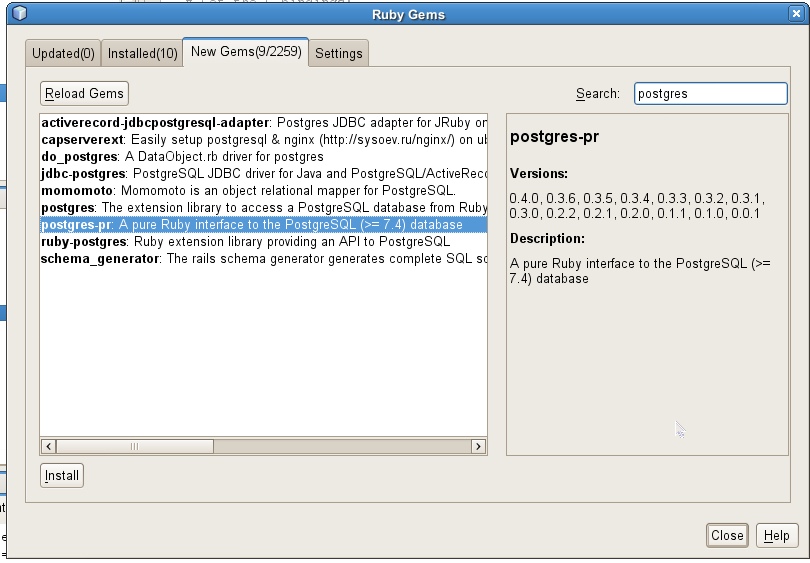
If you want to use JRuby and the Rails that comes with NetBeans, you're ready to go. When you create a new Ruby on Rails project, pick "postgres" as the database.
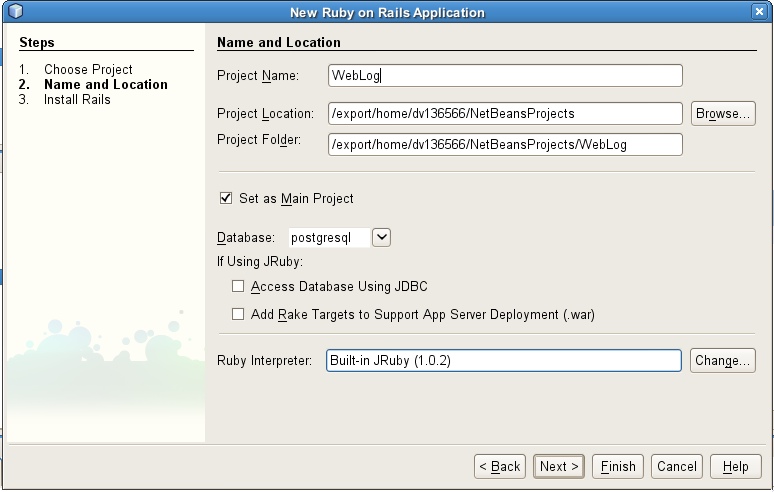
Now, there appears to be a problem with postgres-pr and JRuby, when it tries to use the Postgres UNIX file socket to connect to PostgreSQL. So edit your database.yml file and uncomment the following lines:
With that, you should be good to go.
If you want to use the Cool Stack implementation, first download and install the Ruby package. Then you need to point NetBeans to the CoolStack Rails implementation. Go to Tools->Options, and pick the tab for Ruby. Point Ruby Interpreter to the location for the interpreter, which by default should be /opt/coolstack/bin/ruby.
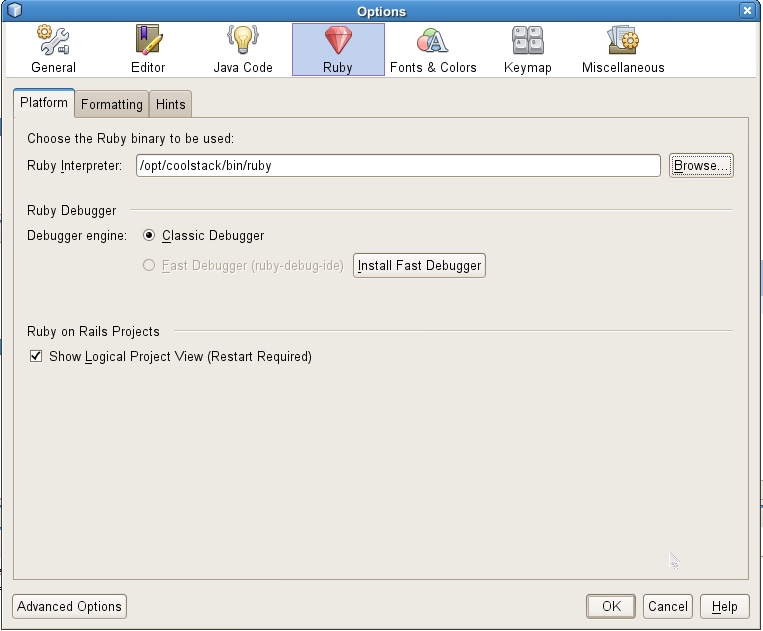
When using Cool Stack Rails, you can use the UNIX socket, so you don't need to modify your database.yml file.
For more information on Postgres and Ruby, see the Ruby Wiki page.
There are two approaches you can do. You can use the Cool Stack Ruby on Rails package, which is optimized for Solaris. Or you can use the JRuby/Ruby On Rails support that comes with NetBeans.
These instructions are for NetBeans 6 RC1, and assume you have installed the bundle with Ruby support or installed the plugin from the update center (see Tools->Plugins).
In either case, you need to install the Postgres driver gem for Ruby. This is easily done, just go to Tools->Ruby Gems, select the New Gems tab, search for "postgres" and pick "postgres-pr". This is the Ruby implementation. I had trouble installing the native implementation, I think I'm missing the postgres header files it needs.
If you want to use JRuby and the Rails that comes with NetBeans, you're ready to go. When you create a new Ruby on Rails project, pick "postgres" as the database.
Now, there appears to be a problem with postgres-pr and JRuby, when it tries to use the Postgres UNIX file socket to connect to PostgreSQL. So edit your database.yml file and uncomment the following lines:
host: localhost
port: 5432
With that, you should be good to go.
If you want to use the Cool Stack implementation, first download and install the Ruby package. Then you need to point NetBeans to the CoolStack Rails implementation. Go to Tools->Options, and pick the tab for Ruby. Point Ruby Interpreter to the location for the interpreter, which by default should be /opt/coolstack/bin/ruby.
When using Cool Stack Rails, you can use the UNIX socket, so you don't need to modify your database.yml file.
For more information on Postgres and Ruby, see the Ruby Wiki page.
Starting PostgreSQL as a service in Solaris Express
I just needed to do this, so I thought I'd document the fairly steps to set up PostgreSQL as a service in Solaris Express Developer Edition version 9/07
PostgreSQL is already installed in Solaris Express, and it's set up as a service, but it is disabled by default. Once you have this set up, then PostgreSQL will always be up and running, even after reboots.
PostgreSQL is already installed in Solaris Express, and it's set up as a service, but it is disabled by default. Once you have this set up, then PostgreSQL will always be up and running, even after reboots.
- Log in as the postgres user, which is pre-created as part of the install of SXDE. I didn't know what the password was, so I had to log in as root first, then change the password using passwd postgres.
- Fix the PATH environment variable so that /usr/postgres/8.2/bin is at the front. The default Postgres commands in /usr/bin are for version 8.1 of PostgreSQL
- Make sure the directory /var/postgres/8.2/data exists; if not, create it
- Initialize your database using the command initdb /var/postgres/8.2/data
- Log out of the postgres user
- Make sure your default user has rights to manage services. Go to Administration->Users and Groups, select your user, and choose Properties, then select the User Privileges tab, and make sure either System Administrator or Service Management is enabled.
- Enable the service using svcadm enable postgresql:version_82
- Run svcs -x. If it shows postgresql, there was a problem, and it will tell you where the log file is to see what went wrong. Run svcs | grep postgres and it should show it as enabled.
- Create a user in Postgres that matches your current user, so you can log in to the database as that user by running createuser userid. Alternately you can run createuser postgres and log in to the database as postgres.
- Verify you can log in to the Postgres server by running the psql command.
Is NetBeans 6 ready to roll? You be the judge.

For this release of NetBeans, we have a survey that users of NetBeans can fill out to tell us whether the release candidate for NetBeans 6, labeled RC1, is fit for production.
Check out this survey link and tell us what you think
Wednesday, November 14, 2007
Putting a face on Mr. D: NetBeans and SunStudio plugins for DTrace
DTrace has won accolades within the Solaris community as delivering something nothing short of miraculous for understanding the root cause of performance issues without becoming a bottleneck to your system itself.
But DTrace is a command-line interface, and one thing it needs is a UI.
Well, the tools teams have been working hard to make this happen. In the latest release of Solaris Express Developer Edition, Sun Studio comes with a plugin called D-Light that helps you visualize DTrace probes.
Nasser Nouri has also delivered a DTrace plugin for NetBeans which looks quite nice.
Sun also provides DTrace support in their optimized AMP stack.
So this is all goodness for those out there who want to deploy AMP solutions to a platform that gives you the tools you need deep observability into your application so you can find and fix performance issues quickly.
But DTrace is a command-line interface, and one thing it needs is a UI.
Well, the tools teams have been working hard to make this happen. In the latest release of Solaris Express Developer Edition, Sun Studio comes with a plugin called D-Light that helps you visualize DTrace probes.
Nasser Nouri has also delivered a DTrace plugin for NetBeans which looks quite nice.
Sun also provides DTrace support in their optimized AMP stack.
So this is all goodness for those out there who want to deploy AMP solutions to a platform that gives you the tools you need deep observability into your application so you can find and fix performance issues quickly.
Tuesday, November 13, 2007
Solaris Express Dev Edition on VMWare Fusion: It's a Go!

I just finished installing Solaris Express Developer Edition 9/07 on VMWare Fusion 1.1 on my MacBook Pro.
Well, I don't know what to say. I just can't think of any complaints. The install was simple and painless, I was able to install the VMWare Fusion tools without a hitch [1], networking Just Works, Firefox Just Works, NetBeans 5.5 Just Works, including Java DB is Just There and Works. File sharing works. Navigation between Solaris and Mac applications works.
I have tried many early installs of Solaris, and I have never been in this baffling situation of having absolutely nothing to complain about (and believe me, I don't keep my mouth shut).
I can go to full screen mode, and it stays in full screen even when I suspend and resume (unlike Ubuntu under Fusion).
I'm downloading Ant and am going to give a NetBeans build a go. We'll see how it goes; I am getting myself ready to shift over to a real developer's platform, that actually has Java 6 and a working version of Open Office and top-level AMP and PostgreSQL support. I'll keep the Mac around for consumer-oriented stuff like playing Rhapsody, but I think in general it's going to start moving to the background of my day...
One other nice thing about running Solaris in Fusion on the Mac -- I can suspend my computer. If you have Solaris installed natively, no suspend. They're working on it, but meanwhile, this is a pretty good workaround.
[1] Well, just one hitch, per Felipe's blog. After installing and you reboot, VMWare thinks you are booting a 64 bit OS in a 32 bit guest. You have to do add the following to the .vmx configuration file:
monitor_control.disable_longmode = 1After you successfully boot this way, VMWare recommends you remove this line as it can confuse some applications.
Thursday, November 08, 2007
DC PHP Conference Takeaway Thoughts

Well, I'm heading back from the PHP conference in DC. This was a simple, small, conference, but I came away from it quite impressed. The speakers were good, the organization was informal but solid, and (this is something quite unusual) the food was quite good. If you're interested, they're already planning to have the next one in the same venue (George Washington University campus of all places, but actually quite cozy) in early June of 2008.
I'm not a PHP programmer myself -- the main goal of my visit was to gain a better understanding of "who" a PHP developer is (if you can make such broad generalizations) and what their priorities are for database tooling. So I spent a lot of time at lunch and breaks chatting up my table buddies and asking them lots of questions. Sometimes I'd even pull out my survey and walk through it with them.
Many of the developers I met are the single "IT guy/gal" in their department. They had more computer skills than the rest in the team, and just pulled out the web and PHP books when they needed to build something. Over time they did this more and more and all of a sudden they were doing PHP for their day job.
In tems of tooling, a vast number of them use and love phpmyadmin (duh, say some of you, I'm sure:)), so I am definitely going to take a look at that.
In general, the primary database tool they care about is SQL query editing and execution. There are frameworks out there like PDO that hide the SQL from the developer, but this is used by a very small minority (I couldn't find anyone using PDO).
Another theme I heard was that Entity/Relationship (E/R) diagrams are useful, not as a design tool, but primarily as a communication tool. Developers need to understand existing schemas, and also communicate their schemas to the end users. There was a lot of head nodding around a feature to allow you to print an E/R diagram to PDF to make it easily distributable over the web and email.
I also particularly wanted to know how important visual query building is. This is a feature that lets you build a query by dragging tables onto a pallette, selecting/deselecting columns, adding filters, joining tables with a line, and the resulting SQL query is built for you. The strong answer I got here was "ah, that would be nice, but I don't really do that. I mostly just hack SQL on the command line."
Many folks don't use an IDE and don't know what value it could have for them. One of them even said "there was this one tool I used that color coded my code for me and when I typed a letter it would show me all methods that started with that letter, man that was so cool!" So I could see that if they get started on an IDE, they would really love it.
However, one thing I noticed is: these are keyboard guys, they want fast response time and fast round trip. They will be turned off by an IDE if it feels "heavy." Luckily NetBeans is modular, and we can provide a PHP bundle that is quite lightweight and should have a reasonable startup time.
Another interesting theme I gathered was that many PHP developers don't have an entire LAMP stack on their machine. They work in the office, connected to the network, and use remote access to their server to deploy and test, even during development.
I need to spend some time thinking about the implications of this for database tooling. In particular, if the database server is only accessible through HTTP, then all our database tooling that requires a direct database connection is not going to be of much value... I can see why phpmyadmin is so popular, because it is web based...
I could imagine building a set of REST services for database tooling like schema metadata management, query editing, and so on, and access these services through NetBeans, allowing you to manage a database over the web through NetBeans. Pretty cool, now that I think of it...
Java One 2008 : Do you have something to say?

Now is the time to submit your presentation or BOF for consideration for Java One 2008.
I submitted one for a BOF demonstrating the upcoming database tool features for NetBeans, and a technical session on trends in persistence and databases. We'll see if they get in.
What about you? Do you have anything you want to say or share with the Java community? Now's your chance.
My father and brother are off to Antarctica
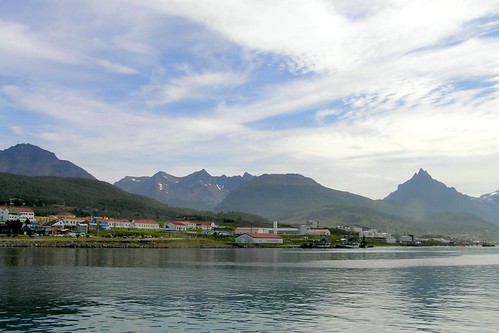
I'm not sure what inspired them to do this, but they are off to the Antarctic. Intrepid family. Here is a missive from my father just before they head off from the tip of Argentina.
I know I am supposed to be in Antarctica, but that's tomorrow. Today I am in the southernmost hotel in Argentina and it has free internet. So instead of catching up on my sleep as Tony is doing over there, I'll pop this note into the virtual bottle and float it out on the digital ocean for you guys to find.
I've never been in Alaska but it has to be like this, with long deep fjords winding past snow- capped mountains. Ushuaia, where we are, was probably a little fishing town 30 years ago. Now it's booming, from the tourist trade, with outfitters and souvenir shops and fancy cafes, block after block, with hotels and pensions up every side street. The main street is full of cars, though it's easily 100 miles by dirt road to Patagonia and civilization.. It looks somewhat like Aspen and somewhat like Anchorage. There are 11 flights a day from Buenos Aires, bringing kayakers and trout fishermen and hikers, plus planeloads of people coming to meet their Antarctic cruise ships. And other cruise ships, doing the round South America thing, drop anchor every day. Steak and wine are cheap - $15 for a big porterhouse - but most prices are similar to New York.
We are on the north side of the Beagle Channel, first mapped by the ship that took Charles Darwin to the Galapagos. South of us, the snowy peaks are in Chile, which wraps around the southern tip of Tierra del Fuego. We will leave by sailing east, not south, until we clear the channel.
Speaking of suddenly growing towns, there is not a stop sign, let alone a signal, anywhere in Ushuaia. As a result there are no accidents, since everyone is scared to death. This reminded Tony of the Mr Barnes who founded the amazing Barnes Museum of modern art in Philadelphia, said to be on money he got from stealing patents. "How do you think he died?" asked Tony. Bad chemicals? Outraged fellow chemist? "Nope. He ran a red light." And? "And, served him right. He never stopped for red lights in his whole life. He grew up without them and he objected when they started putting them up, so he ran them all to express his disapproval. He got away with it until he was well into his sixties."
Today, us early arrivers - 10 in all - hired a van to take us out to Harberton Ranch, the first ranch ever established in Tierra del Fuego. It is a piece of about 5,000 acres given to a missionary by the Argentine government in honor of his service with the surviving Indians (the tribe of near-naked savages who went around with snow melting on them, and from which Darwin abducted or borrowed the man they named Jeremy Buttons, who went back to England and was a sensation until he caught a cold or something and died.
[ed note: there is a great book called To the Edge of The World, a wonderful historical novel all about Darwin's visits to Tierra Del Fuego, including Jeremy Buttons and the Fuegian Indians. Highly recommended.]
It is still in the family, but the present owner, a goofy-looking but nice guy named Tom Goodall, had the good luck to marry Natalie, a girl from Ohio who came down to study Fuegian plants. Which she did, but she also liked to pick up whale bones and skulls along the beaches. One day a marine mammal guy from the Smithsonian came by, and she invited him to look at what she had. Oh, OK, I guess -- but when he saw them he nearly dropped dead. Among the 60 or 70 skulls were several that were known by only one other specimen, and there was one that was new to science. Long story short, she switched to marine mammals, started beach combing in earnest, got money from Total oil company to build a museum, and now has a collection of whale, porpoise and dolphin material -- in this little private museum sitting at the end of a dirt road 35 miles from Ushuaia -- that is considered the second most important in the world.
If you look at a world map you can see why. Tierra del Fuego sticks down into the Circumantarctic Current like a fish-hook, and everything that dies or is sick in the whole Southern Ocean washes up on its eastern shore. Tom's brother has a ranch up there, and she and her students go up and look for stranded dead whales, and whale bones. She is now stout and white-haired with bad knees and breast cancer, but we got a three hour tour thanks to Darrel, who organized our trip and who had been to Antarctica 40 times as an expedition leader (Enid and I met him on an Indian Ocean cruise, however). For instance, she has skulls of five differerent species of beaked whales, and nobody else has more than 2 or 3. It was totally amazing. With Ushuaia booming, they now get busloads of tourists every day and are building a new restaurant on the hill above the museum. They also run boats out to an island they own, where gentoo and magellanian penguins make nests in burrows among the grass.
We went out there, and walked carefully along paths marked out between the penguin nests. It was just like the Galapagos - they just looked at us, bored. Not frightened at all. But I about had a heart attack when a huge skua gull leaped into the air and hovered in front of my face with her sharp beak gaping in threat -- I had come just a little too close to her egg on the ground.
What a great start for what looks like a great trip! I will keep collecting notes, but this may be the last from us for a while.
Love to all
Wednesday, November 07, 2007
My Mac becomes a VMWare host
As promised, I'm moving away from Mac as my primary working environment. I need Java 6, it doesn't have the best integration with the AMP stack, which I need to work with right now, and so on.
But I'm not fully giving up on Mac OSX. It is now my hosting environment for VMWare Fusion. I am typing this blog in fullscreen mode in Ubuntu under VMWare. I am realizing that for many a computer could easily turn from a single computer to a hosting environment for many computers. This is especially useful for developers, because it gives you flexibility, freedom, and the ability to easily test on many platforms. A real wave of the future.
I installed Indiana, and I am working on installing Solaris Express Developer Edition. I'd like to work with Solaris - I like ZFS and I remember how blazingly fast Solaris is, particularly with disk I/O. Indiana had an incredibly nice install experience, it's actually hard to believe after previous experiences with the Solaris installation. This is just an amazing, amazing improvement and the team deserves very high accolades.
However, Indiana doesn't have things fully integrated yet (it's missing Java, PostgreSQL, MySQL, and so on). I tried using the new package management system but nothing seemed to be available. I'm going to keep working on getting this set up, but I'm not quite ready to dedicate my day-to-day working life under Indiana. Indiana looks very promising and I think ultimately that's where I'm going to end up.
Next up is Solaris Express Developer Edition. I've heard the install is also vastly improved, and it has a lot more things integrated, including NetBeans. So I'll let you know how that goes.
But I'm not fully giving up on Mac OSX. It is now my hosting environment for VMWare Fusion. I am typing this blog in fullscreen mode in Ubuntu under VMWare. I am realizing that for many a computer could easily turn from a single computer to a hosting environment for many computers. This is especially useful for developers, because it gives you flexibility, freedom, and the ability to easily test on many platforms. A real wave of the future.
I installed Indiana, and I am working on installing Solaris Express Developer Edition. I'd like to work with Solaris - I like ZFS and I remember how blazingly fast Solaris is, particularly with disk I/O. Indiana had an incredibly nice install experience, it's actually hard to believe after previous experiences with the Solaris installation. This is just an amazing, amazing improvement and the team deserves very high accolades.
However, Indiana doesn't have things fully integrated yet (it's missing Java, PostgreSQL, MySQL, and so on). I tried using the new package management system but nothing seemed to be available. I'm going to keep working on getting this set up, but I'm not quite ready to dedicate my day-to-day working life under Indiana. Indiana looks very promising and I think ultimately that's where I'm going to end up.
Next up is Solaris Express Developer Edition. I've heard the install is also vastly improved, and it has a lot more things integrated, including NetBeans. So I'll let you know how that goes.
Oracle's big presence at PHP Conference: Can you say LOAP?
Oracle has a very strong presence at this PHP conference. They are a "Presidential" sponsor, had a keynote, and handed out a slew of CDs in the conference tote bag. As a matter of fact, their stuff was the only real thing included in the tote bag.
Let's see, what do we have here, let me open the box...
To me this means that Oracle definitely notices that there are a growing number of apps built with the LAMP stack, and I suspect they are trying to make a presence here -- they want to see more LOAP (Linux-Oracle-Apache-PHP) and less LAMP.
It's funny how they are trying to associate themselves with the open source community without actually going open source. More than once I have heard Oracle reps assert that the value of open source is free, and that since they now have a free version, all things should be equal.
As I have mentioned before, I think they are missing the point. Or they get the point, but are not in a position business-wise to say publicly that they get the point. Their best and only possible response to an open source threat is to make a (slightly crippled) version of their software available for free and market it to developers.
Solaris was in the same boat with Linux, and it was suffering. But we actually took the plunge and made Solaris open source, so now it really is a level playing field.
Oracle's cash cow is still database revenue. So, as Nitin Borwankar predicts, they cannot mess with that business model, and this is limiting their options to how they react to open source databases.
Perhaps some day more of their revenue will shift to their application stack, support and services, and they could potentially sacrifice the cow and open source their database and make the fully functional version absolutely free.
They could start charging at the point of value - when the user purchases services and support for their mission-critical production application. But right now they appear to be staying with their existing business model, and are doing their best to stop or slow the open source database juggernaut. We'll just have to see how that strategy pans out...
Let's see, what do we have here, let me open the box...
- Four (count them ) 4 copies of Enterprise Linux 4 - Oracle's supported distribution of Enterprise Linux
- Enterprise Linux 5 and an associated source CD
- Oracle Database 11g for Linux
- Database Developer CD for Linux
- Java and PHP Developer DVD (Preview)
To me this means that Oracle definitely notices that there are a growing number of apps built with the LAMP stack, and I suspect they are trying to make a presence here -- they want to see more LOAP (Linux-Oracle-Apache-PHP) and less LAMP.
It's funny how they are trying to associate themselves with the open source community without actually going open source. More than once I have heard Oracle reps assert that the value of open source is free, and that since they now have a free version, all things should be equal.
As I have mentioned before, I think they are missing the point. Or they get the point, but are not in a position business-wise to say publicly that they get the point. Their best and only possible response to an open source threat is to make a (slightly crippled) version of their software available for free and market it to developers.
Solaris was in the same boat with Linux, and it was suffering. But we actually took the plunge and made Solaris open source, so now it really is a level playing field.
Oracle's cash cow is still database revenue. So, as Nitin Borwankar predicts, they cannot mess with that business model, and this is limiting their options to how they react to open source databases.
Perhaps some day more of their revenue will shift to their application stack, support and services, and they could potentially sacrifice the cow and open source their database and make the fully functional version absolutely free.
They could start charging at the point of value - when the user purchases services and support for their mission-critical production application. But right now they appear to be staying with their existing business model, and are doing their best to stop or slow the open source database juggernaut. We'll just have to see how that strategy pans out...
At PHP Conference in Washington, DC

Here I am in Washington, DC at the PHP developer's conference.
It is a very small conference compared to say JavaOne and OSCON, but that makes it quite cozy and friendly. There are maybe 200 folks here. It's quite surprising, given how many PHP developers there are, and this appears to be the only conference in the USA besides the Zend conference that just happened.
I took the red-eye last night (first time on Jet Blue, very nice!), rented a car, and got immediately stuck in nasty stop-and-go traffic coming out of the Dulles airport. I had rented a GPS navigator, so I found the closest Metro station, parked, and did public transit into the city. I am not a car driver (I take BART to Menlo Park twice a week into Menlo Park and love it). I'll pick up my car this evening and take it to my hotel in Alexandria ($100 a night, thanks Priceline! Sun Travel couldn't find anything below $400 a night).
What, might you ask, is a Java programmer like me doing at a PHP conference in DC?
Well, I want to find out more about the PHP community, and start learning what we might be able to do in the database tooling area of NetBeans to make NetBeans useful/attractive to PHP developers.
It's not my area to build a good PHP editor, but one thing we could do is make it very easy to work with databases in PHP. But I need to find out what PHP developers care about around databases. In some ways I suspect it's what all developers care about: schema management, querying and data management. But there are subtleties, like how important is a visual query tool versus text-based query tools. How important are ORM APIs like PDO and frameworks? What kind of caching is done, if any, with things like memcached (good results from coming to this conference, already, I just found out about Facebook's open-source PHP caching technology called APC). Maybe it would be really cool to do in-place query editing, where you get code completion and syntax highlighting for SQL right inside the PHP editor, but would anyone care?
I did a survey around these kinds of things, but so far only 12 PHP developers have responded. So I'm also trying to recruit more PHP developers to fill in this very short survey. If you're a PHP hacker, please fill in the survey, it takes 10 minutes maximum.
In the meantime, as the conference moves along, I'll report back to you anything I find interesting.
Friday, November 02, 2007
CAFEBABE: A vote for Java 6 on the Mac

In an attempt to have our voice heard, let's spread the word. If you want Java 6 on the Mac, or at least have Apple tell us when they plan to deliver it rather than be silent, then post a blog with this magic cookie:
13949712720901ForOSX(13949712720901 is "CAFEBABE" in hex, the magic cookie for Java class files).
Search for this string using your favorite search engine, and you can see how many votes there are.
This apparently had great impact with Nova Spivak's effort to bring attention to the plight of the Burmese people, although I do find the Java 6 on the Mac issue a little less important than the suffering and repression of an entire country.
Thanks to Henry Story for the idea and for kicking this off.
And thanks to Fredericiana for the fun photo.
'Project Indiana' OpenSolaris Preview Debuts
A binary distribution of OpenSolaris with Linux Userland CLI support and a spanking new network-based package management system. Now *that* sounds cool!
Subscribe to:
Posts (Atom)